
Performance
The top bar always shows two numbers: DSP, the share of each audio buffer spent processing the chain, and CPU. The dot next to them is green, then orange, then red as the load rises. When the DSP load reaches 100 %, the audio drops out.
Tap them to open the resource monitor.
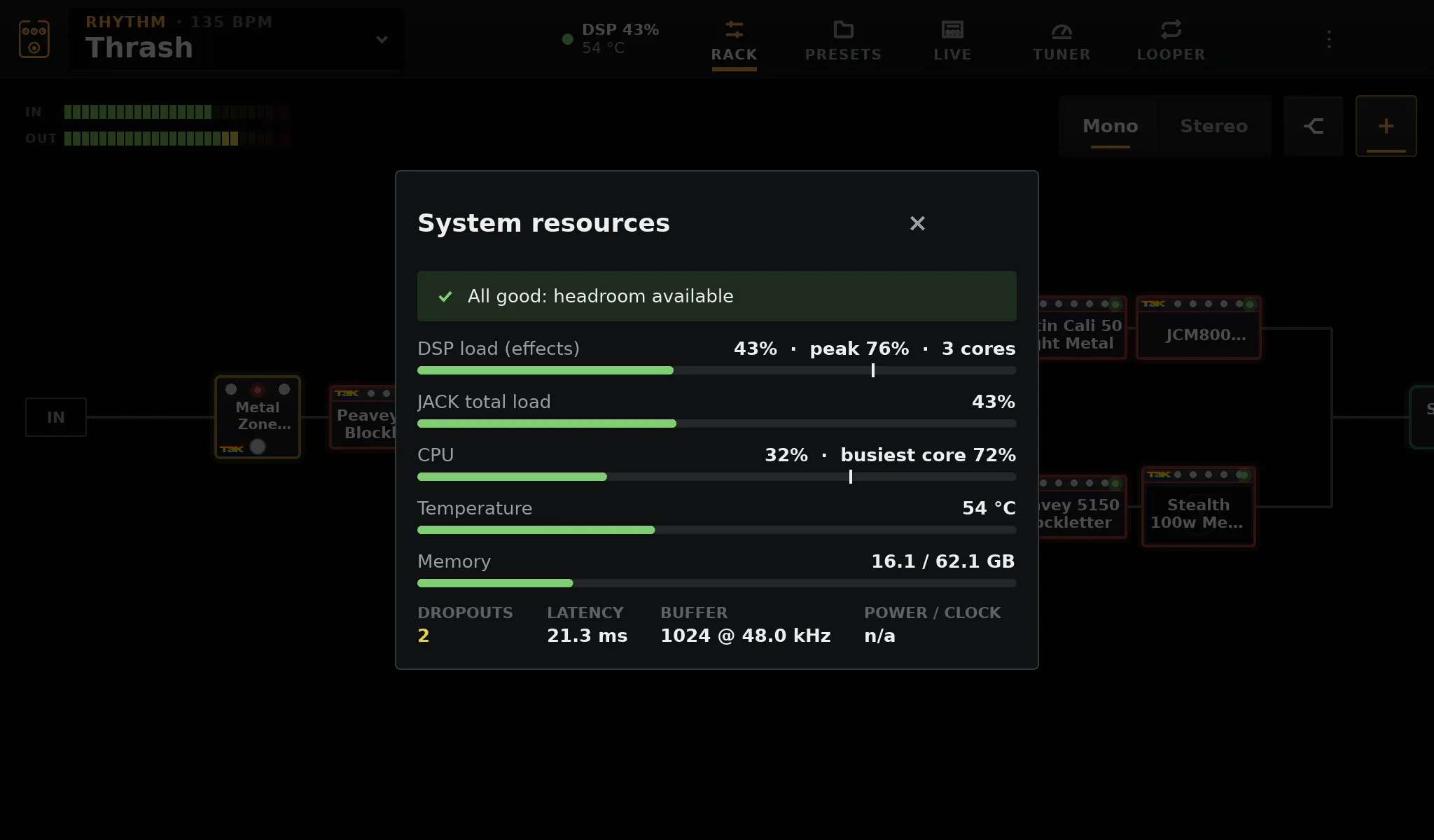
| Line | What it means |
|---|---|
| DSP load (effects) | Time spent processing the chain, against the buffer’s duration: average and peak. · N cores when the chain ran on several cores |
| JACK total load | The audio server’s own measure, the chain included |
| CPU | Total, and the busiest core |
| Temperature | The SoC temperature, on a Pi |
| Memory | Used and total |
| Dropouts | Xruns since start: each one is a click |
| Latency, Buffer | From pedalboard.txt |
| Power / clock | On a Pi: under-voltage and throttling |
The banner at the top sums it up, from “All good: headroom available” to a warning.
Adding a block while the load is already high shows a warning. The block editor shows how much of a CPU core each block uses.
Multi-core DSP
Section titled “Multi-core DSP”A heavy rig no longer has to fit on one core. On the Raspberry Pi 5 that means all four Cortex-A76 cores work on the sound instead of one, and a mini PC uses its cores the same way (up to 8).
- Splits: the two branches of a split play at once, each on its own core.
- Long chains: a long chain is cut into stages of about the same cost, each on its core. Each period goes through them in 8 slices, like an assembly line: a stage starts a slice as soon as the one before has finished it. This adds no latency, and the sound is bit for bit the same as on one core: a test checks it.
- Preset changes: during the crossfade, the old and the new chain play on two cores, so switching between two heavy presets does not overload.
- Light rigs stay on one core: spreading them would cost more than it saves. A block that feeds a send stays on the audio thread.
When the chain uses several cores, the monitor shows it next to the DSP load, for instance
42% · peak 51% · 3 cores.
Settings → Processing
Section titled “Settings → Processing”DSP cores sets how many cores the effects may use: Auto (the default: all of them, 4 on a Pi 5) or a fixed number from 1 up. There is little reason to change it; 1 core is the behaviour of earlier versions, to compare. The card only shows on a machine with more than one core.
What it changes
Section titled “What it changes”Measured on an x86_64 test machine (PREEMPT_RT kernel, 4 cores, 128-frame buffer at 48 kHz),
time to process one period, one core against Auto:
| Rig | 1 core | Auto | |
|---|---|---|---|
| 8 neural captures in series | 935 µs | 417 µs | × 2.2 |
| 4 splits in a row, one capture per branch | 925 µs | 424 µs | × 2.2 |
| One split, 2 captures per branch | 450 µs | 223 µs | × 2 |
A period of 128 frames lasts 2667 µs. With 16 captures in series, the audio server counted 533 dropouts in 60 s on one core, and 17 on Auto.
Measure your own rig
Section titled “Measure your own rig”The image ships pedalboard-bench, which times a rig of neural blocks offline, period by period,
the way the audio thread runs it. Over SSH, with any capture:
cd /data/pedalboard/modelsWORKERS=0 pedalboard-bench "My captures/amp.nam" serial 8 # one coreWORKERS=3 pedalboard-bench "My captures/amp.nam" serial 8 # four coresWORKERS is the number of cores used besides the audio thread. The rig is serial N (N blocks
in a row), split N (a split with N blocks in each branch) or splits N (N splits in a row, one
block per branch). PERIOD sets the buffer (128 frames by default). It prints the time per
period (mean, 99th percentile and worst) and the share of the period that is.
What costs what
Section titled “What costs what”- Neural captures cost the most. A full A2 capture is about 12 % of a Pi 5 core at 128 frames. Use Quality: Light (about a quarter of that) on boosters and pedals, and prefer lite or feather captures when stacking several.
- Impulse responses have a flat, moderate cost; long rooms are convolved partly on another thread.
- In stereo, cabinets, spaces and mono LV2 plugins after the point where the signal becomes stereo run twice.
If you hear clicks
Section titled “If you hear clicks”- Look at the Dropouts count in the monitor while it clicks.
- If the DSP load is high, check that Settings → Processing → DSP cores is on Auto, then lighten the chain: Light quality, smaller captures, fewer blocks after a stereo split.
- If the load is low but xruns still rise, raise the buffer to 256 frames in
Settings → Audio & system (or
period=256in pedalboard.txt). - On a Pi, check for under-voltage in the monitor: use the official 27 W supply.