
Remote control
Use your phone or tablet as the pedalboard’s screen: open its address in a web browser, sign in, and play. Nothing to install. A pedalboard built without a touchscreen uses it as its only screen; one with a touchscreen gets a second one, in your hand.
The browser has two modes:
- Editor: the pedalboard’s own screens (rack, presets, store, settings…), on your tablet or phone turned sideways. Tap, drag, scroll and type as on the touchscreen.
- Live: a portrait page for the stage: presets and scenes, setlist slots, tap tempo, the tuner, the meters, and every block with its bypass and its controls: first the knobs of its knob strip, in the same order as on the pedal, then all of them on demand.
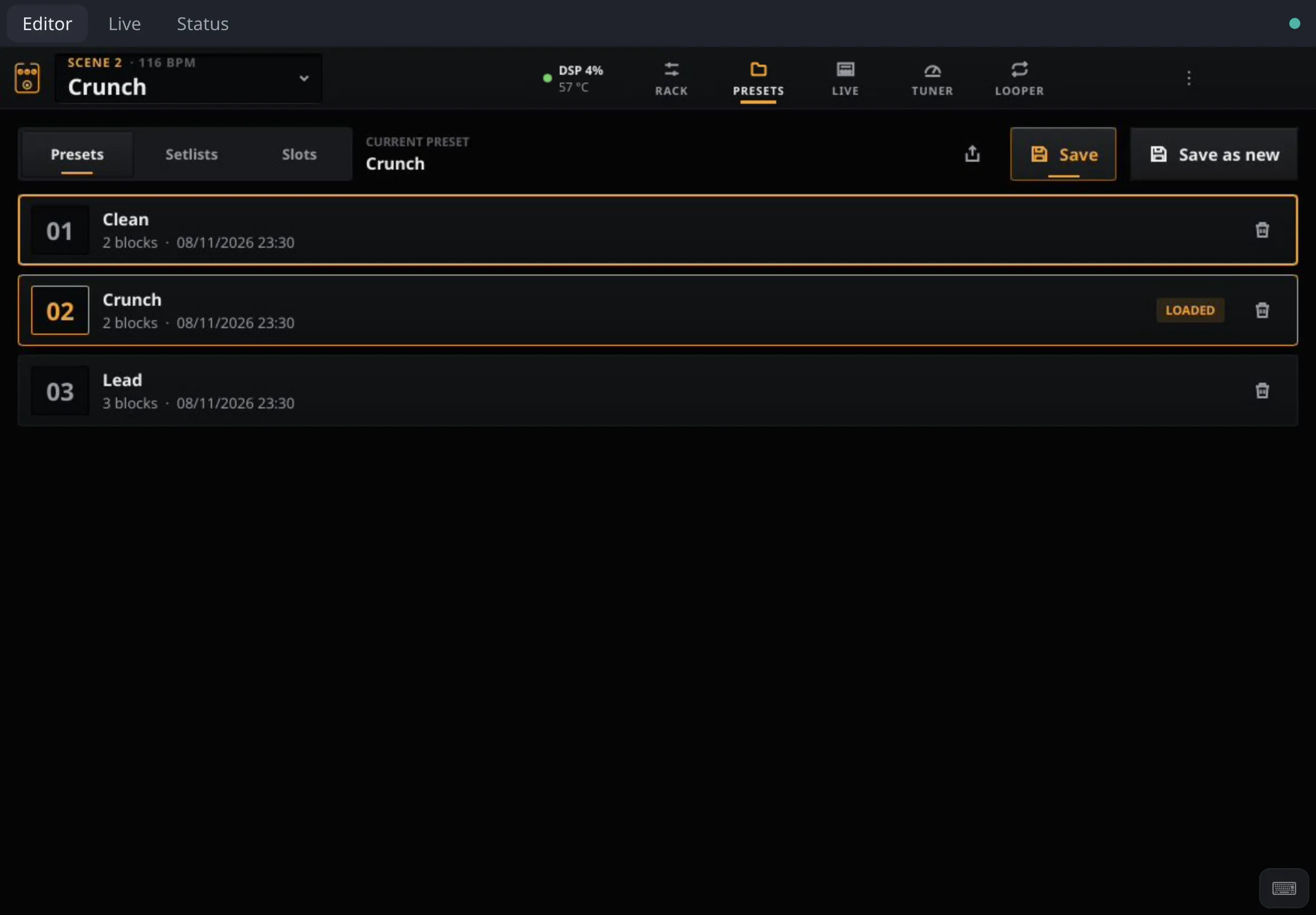
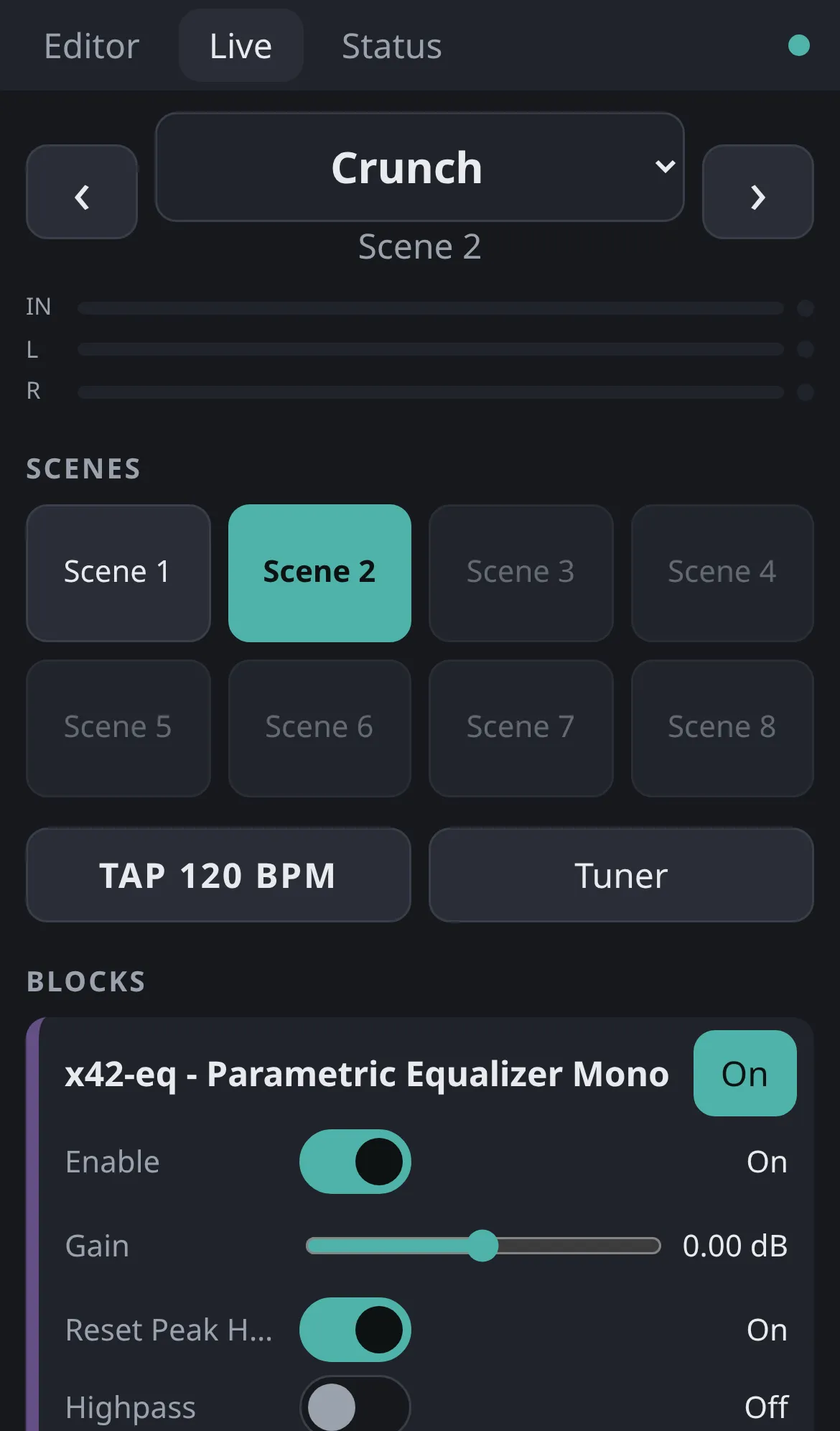
On Android, an iPad or a computer, the button at the right of the tabs puts the page in full screen.
The remote control is off until you choose a password.
Turn it on
Section titled “Turn it on”With a touchscreen
Section titled “With a touchscreen”Settings → Remote control: turn it on and choose a password (8 to 63 characters). The card shows the addresses to open, how many devices are connected, and the hotspot. Change password and Sign out all devices are there too.
Without a screen
Section titled “Without a screen”Before starting the pedalboard, put the card in a computer and edit
pedalboard.txt:
remote_password=choose-8-to-63-characters
# Optional: a Wi-Fi network to joinwifi_ssid=Homewifi_password=its-key
At the next start, the pedalboard keeps them and replaces them in the file with (saved): the
card holds no password afterwards. Write a new value to change one, or remote_password=off to
turn the remote control off.
Then, on your phone or tablet, either:
- join the pedalboard’s Wi-Fi, OpenRig-XXXX (its key is the remote control password), and open http://10.42.0.1;
- or, on your own network, open
http://and the pedalboard’s address (your router lists it aspedalboard).
Without a touchscreen
Section titled “Without a touchscreen”With a remote control password and no touchscreen (no display, or a monitor without touch),
the pedalboard’s screens are for your phone or tablet, and a connected monitor keeps the
OpenRig logo. display in pedalboard.txt chooses by hand:
display |
|
|---|---|
auto (default) |
The touchscreen if there is one, else your phone or tablet (with a password set) |
screen |
Always the touchscreen |
remote |
Always your phone or tablet |
The pedalboard’s hotspot
Section titled “The pedalboard’s hotspot”When there is no network to share, the pedalboard brings its own: OpenRig-XXXX, protected by
the remote control password. remote_hotspot in pedalboard.txt, or the buttons in
Settings → Remote control:
remote_hotspot |
|
|---|---|
auto (default) |
Started when the pedalboard has no network 45 s after starting |
on |
Always (the pedalboard does not join another Wi-Fi then) |
off |
Never |
The hotspot reaches only the pedalboard, not the Internet. Some mini PCs have Wi-Fi cards that cannot make a hotspot: the pedalboard says so, and the remote control still works over your network.
Full screen
Section titled “Full screen”The button at the right of the tabs puts the page in full screen, without the address bar and the system bars, and back. It works on Android, on iPad and in desktop browsers. iPhone Safari cannot show a page in full screen, so the button is not there. Added to the home screen, the page opens in full screen by itself.
Smooth frames
Section titled “Smooth frames”The Editor is streamed at up to about 30 frames per second, and only the parts of the screen that change are sent. After a tap, a drag or a key, the frame that shows its effect is sent as soon as the pedalboard has drawn it, without waiting for the next frame. Knobs, footswitches and rack blocks are drawn flat in the browser, without their gradient.
Safety
Section titled “Safety”- Only devices on your local network can connect, and only with the password. Wrong passwords slow down after three tries.
- Sign out all devices (or a new password) disconnects everyone at once; so does a restart.
- On someone else’s Wi-Fi (a venue, a hotel), other people on that network can see what the pedalboard and your phone exchange. Use the pedalboard’s hotspot, or a network you trust.
- Anyone with the password controls the whole pedalboard. Sharing the hotspot shares the control.